How to Play Drums with Your Hands: The Gesture Synth Air Drums Guide
Learn how to play drums in Gesture Synth with a webcam: open Air Drums, aim with your index fingers, hit six virtual pads, and record a performance.
 TideSparrow
If you searched for how to play drums, this guide is about the Air Drums mode on Gesture Synth. You do not need sticks or a pedal. Your webcam tracks your index fingers, and the kit appears in the lower part of the instrument.
The quickest way in is the Air Drums card on the Hand Gesture Music page. Click Open Air Drums, then follow the steps below.
Start Air Drums
Use a laptop or desktop with a current version of Chrome or Edge. Sit somewhere with even light on your hands. Keep your wrists and fingertips inside the camera frame.
- Open the Hand Gesture Music page.
- Click Open Air Drums in the Air Drums card.
- Allow camera access when the browser asks.
- Click inside the instrument once if the browser has not started audio yet.
Wait for the hand model to finish loading. The status line should say Air Drums · point with an index finger and tap down.
What you can hit
Gesture Synth has six playable targets:
- Hi-hat for a steady pulse
- Snare for a sharp backbeat
- High tom, mid tom, and floor tom for fills
- Crash for an accent or the start of a phrase
There is no foot pedal in this mode. Every sound comes from a hand movement, so start with the two targets you can see most clearly: the hi-hat and snare.
How one hit works
Use the index finger on either hand as your drumstick.
- Point at the drum or cymbal you want to play.
- Tap the fingertip down into the target.
- Lift it slightly before the next hit.
The downward movement triggers the sound. A faster tap makes a louder hit. If you hold your fingertip on the target, the next hit may not trigger until you lift and tap again.
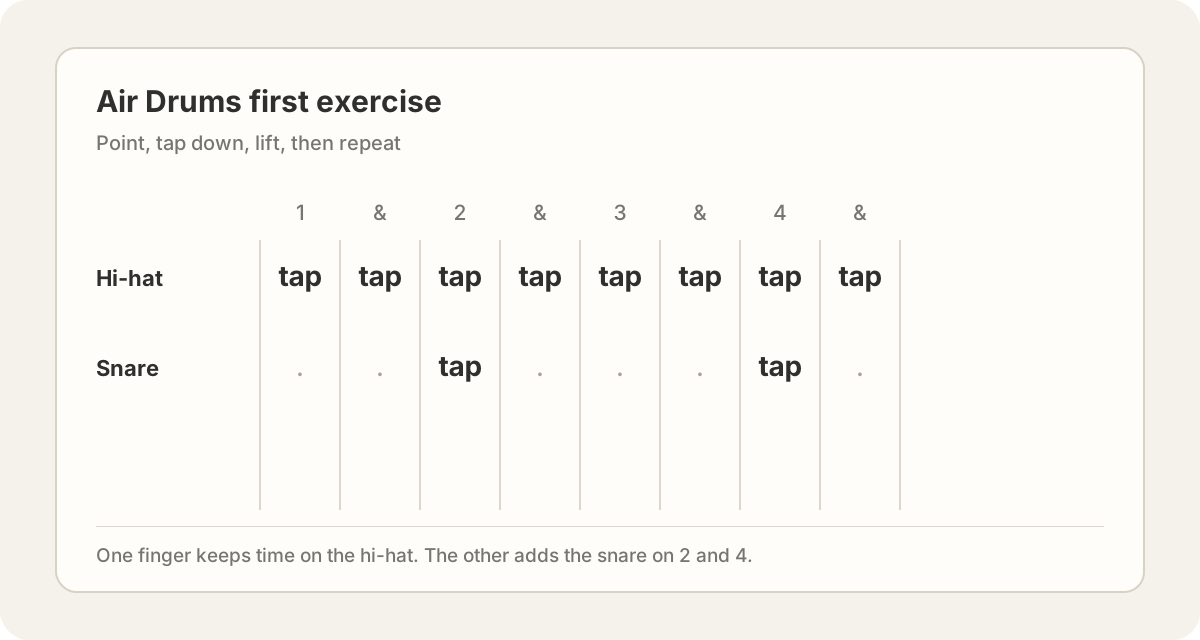
Try this simple exercise:
- Use one index finger to tap the hi-hat on 1 & 2 & 3 & 4 &.
- Use the other index finger to tap the snare on 2 and 4.
- Keep the taps small and leave a little space between each one.
Do not chase speed. If a hit disappears, slow down and make the tap more obvious.
Try a few other ways to play
Once the first pattern works, keep the same count and change the target.
- Tap the hi-hat with one hand while the other hand plays a short high tom, mid tom, floor tom fill.
- Hit the crash at the start of a new phrase.
- Use both index fingers at the same time for a crash and snare accent.
- Play one hand at a time if the camera loses track of both hands.
The target lights up when a hit is detected. Watch the target response more than the camera preview. It gives you a quicker answer about whether your hand is landing in the right place.
Record your performance
When you have a pattern you like, use the red Record control at the top of the instrument. For Air Drums, it captures the camera view, the drum overlay, and the sounds together as a downloadable performance.
Start recording, wait for the count-in, and play the same hi-hat and snare exercise for four bars. Add the tom fill at the end of the fourth bar if you want a clear finish.
If you want to try again, stop the recording and start a new one. Your browser creates the file locally. It does not need to upload the performance first.
If the drums do not respond
- No sound: click inside the instrument and check that your device is not muted.
- Camera blocked: allow camera access in the browser site settings, then reload.
- Hits are missed: move your hands farther from your face, keep the index fingers apart, and lift between taps.
- The wrong drum plays: point at the center of the target and slow your hand down before tapping.
- Tracking feels unstable: face a light source, remove busy backgrounds behind your hands, and keep both fingertips visible.
That is the whole first session. Open the Hand Gesture Music page, choose Air Drums, make the hi-hat steady, add the snare on two and four, then use the toms and crash when you are ready for a little more movement.