How Gesture Synth Turns Hand Landmarks Into Music
An engineering walkthrough of Gesture Synth: camera permission, MediaPipe hand landmarks, smoothing, chord and hit detection, Web Audio, loops, and local recording.
 TideSparrow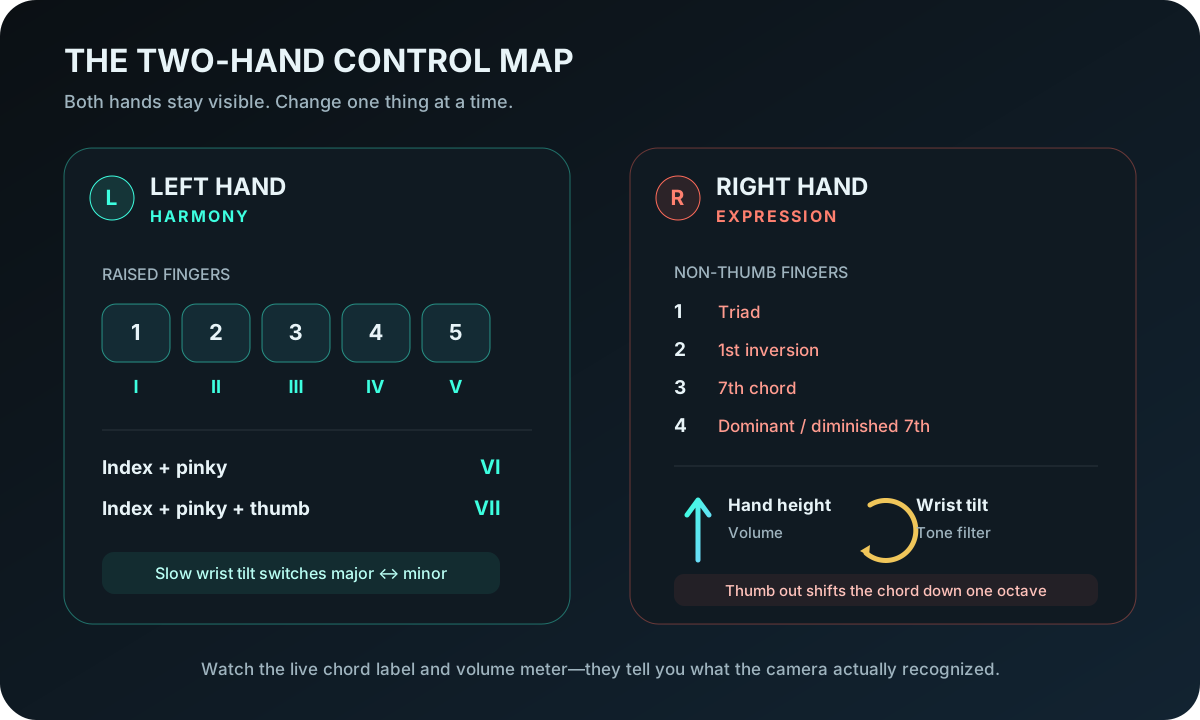
Gesture Synth does not send a camera frame to a server and wait for an AI service to decide which note to play. The control loop runs in the browser. A hand-tracking model reports landmarks, small deterministic functions turn those points into musical events, and Web Audio produces the sound.
This article documents that pipeline as it is implemented in the public Gesture Synth source. The exact thresholds matter because a gesture instrument has to answer two competing needs: it should react quickly, but it should not turn tracking noise into extra notes.
1. Nothing starts before the player presses Start
The camera is permission-gated. Gesture Synth asks the browser for a 640 × 480 video stream with audio disabled only after the player starts the instrument. Denying permission leaves the camera unavailable; the site does not attempt to work around the browser choice.
After permission is granted, the page loads MediaPipe Tasks Vision and a Hand Landmarker model. It asks for up to two hands and uses the GPU delegate first, with a CPU fallback when GPU initialization fails. Detection, hand-presence, and tracking confidence are each set to 0.62. That value is a practical compromise: raising it can drop partially visible hands, while lowering it can accept less reliable detections.
The runtime comes from jsDelivr and the model file comes from Google's MediaPipe model storage. Those downloads involve ordinary web requests, but the recognition loop runs on the device after the files arrive. Camera frames are not uploaded to Gesture Synth for hand recognition.
2. Twenty-one landmarks become a stable hand
MediaPipe reports 21 normalized points for each detected hand: the wrist, thumb joints, and four joints for each finger. Gesture Synth reads points such as the wrist at index 0, thumb tip at 4, index fingertip at 8, middle fingertip at 12, ring fingertip at 16, and pinky tip at 20.
The visible camera is mirrored like a selfie view, so the implementation corrects handedness before using left- and right-hand controls. It then smooths each landmark toward the new position by 55 percent per processed frame. If the wrist jumps by more than 0.2 in normalized camera coordinates, smoothing resets instead of dragging the old hand across the frame.
This is deliberately modest smoothing. More smoothing makes the display calmer but adds musical latency. Less smoothing feels immediate but makes a fingertip hover around the edge of a key or drum target.
3. Chords use poses, then wait for stability
Gesture Chords reads whether each fingertip sits above its middle joint and whether the thumb extends outward. One through five raised fingers select scale degrees I through V. The index-plus-pinky shapes provide VI and VII, while wrist orientation can select major or minor behavior.
The two hands have different jobs. The left hand chooses the Roman-numeral chord. The right hand controls chord quality, volume, tone, and octave. Hand height maps to volume; wrist tilt changes the filter; and the thumb can drop the chord by an octave.
A raw pose is not played immediately. It must remain stable for 100 milliseconds before it becomes the committed chord, and a missing detection gets a 50-millisecond grace period. Those short windows remove a large amount of flicker without making a deliberate change feel slow.
4. Theremin pitch uses a musical curve, not a straight line
Air Theremin uses one hand for pitch and the other for volume. Vertical hand position is converted to a value between 0 and 1, then mapped exponentially from roughly 65 Hz to 1,200 Hz.
An exponential map matters because musical pitch is logarithmic. A straight frequency line would pack the low notes into a small area and make the upper range too sensitive. The exponential curve gives each octave a more consistent amount of movement.
The theremin becomes active only when both control hands are visible and volume is above a small floor. The oscillator frequency and gain move toward their targets rather than jumping instantly, which reduces clicks and abrupt pitch steps.
5. Piano, flute, and drums detect movement through targets
Pointing at an on-screen object is not enough to count as a hit. Gesture Piano, Air Flute, and Air Drums track motion over time and look for a downward stroke that crosses a playable target.
Before hit testing, camera coordinates are transformed into the displayed stage. The calculation accounts for the crop created when the camera and instrument have different aspect ratios, then mirrors the horizontal position so the landmark and visible fingertip agree.
Gesture Piano exposes 15 white keys from C4 through C6 plus 10 black keys. Black keys are checked first where they overlap white keys. Every extended fingertip can play, but a hit requires downward speed, minimum travel, and a valid target. After a hit, that finger must lift before it is armed again. An 80-millisecond per-finger cooldown suppresses accidental double triggers.
Air Flute uses the same five fingertips on each hand and six visible holes from G5 to E6. A fingertip can tap for an attack or remain pressed to sustain the sample. Leaving the hole or lifting far enough rearms the finger.
Air Drums uses the two index fingertips as sticks. The kit has six elliptical targets: crash, hi-hat, snare, high tom, mid tom, and floor tom. The detector considers the path between the previous and current point, not only the final frame, so a fast stroke that crosses a pad can still register. Downward speed also contributes to hit velocity.
6. The sound engine stays separate from tracking
Gesture detection produces musical facts: a frequency, chord, target ID, velocity, or volume. The audio engine consumes those facts through the Web Audio API. This separation keeps camera geometry out of sound generation and makes the deterministic detection pieces testable without a live webcam.
Chords and piano use synthesized voices. Air Theremin maintains a continuous oscillator. Air Flute selects from six recorded note samples, and Air Drums loads separate samples for each kit piece. The player can change pitch range and mix levels without changing what the hand tracker sees.
7. Loops and recordings are two different outputs
The four loop tracks store musical events and replay them against a tempo grid. Their Export control renders the mixed audio. The top Screen control records a different result: the instrument canvas at 30 frames per second combined with the synthesized audio stream.
The recorder checks the formats supported by the current browser, prefers MP4 when available, and otherwise uses WebM. It creates a local object URL and triggers a browser download. Gesture Synth does not automatically upload the finished file or keep a server-side recording archive.
What this design cannot guarantee
The model can lose a hand when fingers overlap, leave the frame, move too quickly, or blend into the background. A webcam also has no physical key surface, so timing will not equal a MIDI keyboard. The thresholds reduce false triggers; they cannot make every camera and room behave identically.
For the cleanest first session, put light in front of your hands, keep wrists and fingertips in frame, leave space between fingers, and use deliberate movements. The Gesture Synth tutorial covers the full setup. For instrument-specific practice, use the Piano guide, Chord guide, or Air Drums guide.
The implementation and its geometry tests are available in the public Gesture Synth repository. That source is the final reference when a control changes after this article's publication date.